Product Review: The BOOX Palma 2 Pro Offers Pocket-Sized E-Reading, Library-Sized Access
Looking for a pocket-sized E Ink e-reading option that will work with your favorite library apps? This one might just fit the bill.

Whenever I leave the house, whether I’m running to the store or traveling to a conference, I always bring something to read. Before the rise of mobile devices, that meant lugging around a physical book. These days, my Kindle Paperwhite is usually by my side.
Still, there are moments when I don't have my book or kindle with me. And without something to read, I either end up doom-scrolling on my phone or, worse—I’m left alone with my own thoughts.
While the Kindle Paperwhite has been a dependable e-reader, like a book, it doesn’t fit easily into my pocket, which makes it less convenient. My Kindle also comes with some notable limitations. For one, I can’t access all the offerings from my public library. And the lack of color makes reading comics and graphic novels far less enjoyable.
Ironically, while killing time on my phone one day because I had nothing to read, I discovered the BOOX Palma 2 Pro.
A phone-sized Android device with a Kaleido 3 Color e-paper display? In the immortal words of Philip J. Fry from Futurama, “Shut up and take my money!”
As luck would have it, the device arrived just days before I traveled to Minneapolis for the annual Public Library Association (PLA) Conference, perfect timing to put it to the test as an on-the-go e-reader.
A Travel-Tested Reading Experience
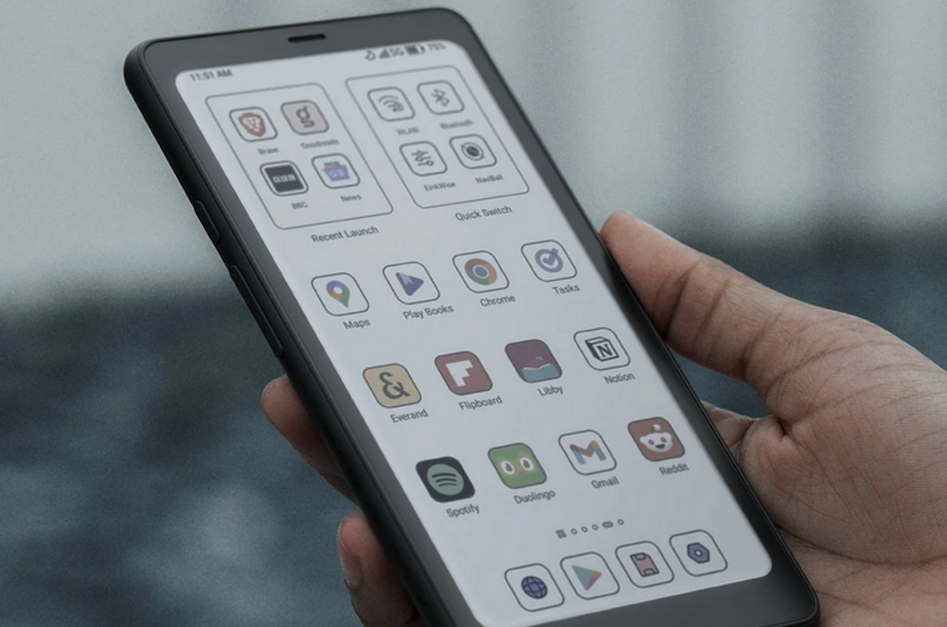
As an Apple user with limited Android experience, I was a bit apprehensive about the setup process. Thankfully, BOOX (and YouTube content creators) offer plenty of clear and helpful setup videos, which made the experience surprisingly smooth. Within 30 minutes of unboxing, I had downloaded all the apps I needed—including Hoopla—and was comfortably reading one-handed.
The Palma 2 Pro’s compact size, about the size of an iPhone 15, and its light weight (approximately six ounces) make it easy to take anywhere. While waiting for my flight to PLA, I downloaded a book from Hoopla using the airport Wi‑Fi and I was reading as soon as I settled into my seat.
The adjustable brightness and warmth settings made it easy to find a comfortable screen configuration that didn’t disturb fellow passengers. Customizing font size and margins significantly improved readability, especially for my aging eyes. And one standout feature is the option to remap the volume buttons for page turning, which made one-handed reading even easier.
Initially, I felt a little self-conscious using the Palma 2 Pro. It probably looked like I was just another passenger glued to my phone.
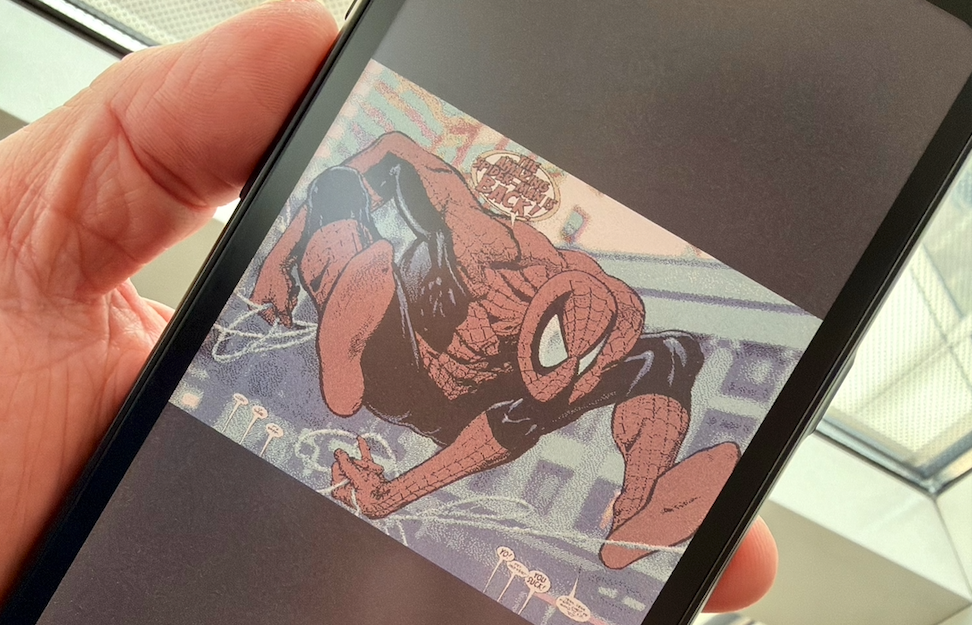
But after about 30 minutes of reading, the person sitting in the aisle seat next to me asked if I was using an e-reader. She turned out to be a fellow librarian attending the PLA Conference. What followed was an impromptu demonstration of the Palma 2 Pro—including its color e-paper display using a graphic novel. Despite the smaller screen size, Hoopla’s Action View made each comic panel pop with color.
Beyond Reading: Audio and Notes
By the time we landed in Minneapolis, the Palma 2 Pro had proven itself an essential travel companion, and I was eager to explore additional features BOOX promotes, particularly note-taking and e-audiobooks.
One of my responsibilities at the PLA Conference was interviewing authors (Simone St. James, Sarah Damhoff, and Melissa Albert), and I used the Palma 2 Pro to listen to e-audiobooks with Bluetooth headphones while preparing. I also appreciated the built-in Notes app, which paired nicely with an InkSense Plus stylus for jotting down notes during keynotes and sessions. While I may not always rely on the Palma 2 Pro for audio or note-taking, it’s reassuring to know these features are both capable, and convenient.
Another advantage for librarians and reviewers is that ebooks and audiobooks from NetGalley can be easily read or played on the Palma 2 Pro. Simply install the NetGalley Shelf app, and you're in business.
Throughout the PLA exhibits, I continued demonstrating the Palma 2 Pro to curious fellow librarians and library staff. Most were impressed by its compact form factor, E-ink display, and ability to run library apps.
Perhaps the biggest downside, however: the $399.99 price point for the color version, and the non-color version priced at an also unpalatable $275.
Still, for librarians seeking a pocket-sized reader, or libraries looking for a lendable e-reader that supports multiple e-reading platforms, the BOOX Palma 2 Pro is potential option.
Final Thoughts
Since returning from the PLA conference, I’ve continued to use the Palma 2 Pro regularly. It lives in my bag or pocket, whether I’m running errands with my family or sneaking in a quick reading break. Can it work for you? Here's a quick rundown of the pros and cons:
Pros
Pocket-sized and lightweight: Phone-sized form factor makes it ideal for travel, commuting, and quick reading sessions.
Full access to library e-materials: Runs Android, allowing use of library apps that are unavailable on many traditional e-readers.
Color e‑ink display: Kaleido 3 Color ePaper enhances comics, graphic novels, and illustrated content without sacrificing eye comfort.
Excellent one-handed reading experience: Comfortable grip, textured back, and programmable volume buttons for page turning.
Highly customizable reading settings: Adjustable brightness, warmth, font size, and margins support extended reading sessions.
Versatile feature set: Supports e‑audiobooks via Bluetooth and note-taking with stylus compatibility.
Strong library appeal: A compelling option for libraries seeking a lendable e-reader that supports multiple digital platforms.
Cons
Premium price point: At $399.99, the Palma 2 Pro may be cost-prohibitive for many users.
Small screen size: While portable, the phone-size display may feel cramped for readers who prefer larger pages, especially for dense text.
Learning curve for non-Android users: Setup may be slightly intimidating for those unfamiliar with Android devices, despite good online support.
Color limitations of e‑ink: While impressive for ePaper, the colors are muted compared to tablets or smartphones.
Not a replacement for all devices: While capable of audio and note-taking, it may not fully replace a primary tablet or notebook for some users, despite the high price.
Kevin King is the Library Solutions Strategist at Midwest Tape/Hoopla Digital. Previously he was the Director at the East Lansing (MI) Public Library, and before that served over 25 years at the Kalamazoo (MI) Public Library. Over the course of his career, he has presented on a variety of topics including innovation, trauma-informed care, organizational health, and library safety and security.